
Home / Products / AQuick

Spot a hazard — issue the correction on the spot

AQuick lets you handle record – manage – share – export safety and quality instructions from iPad, iPhone and Android. Developed with Takenaka, Toda, Nishimatsu and Takada Kogyo for safety patrol work.
AQuick on a mobile device
What is AQuick

A tool for managing safety and quality instructions

Instructions go out the moment a hazard is found — no more “spotted in the morning, fixed in the afternoon”.

Before

  • Delayed recording leads to missed corrections
  • Hard to keep track of what needs fixing
  • Communication and follow-up are clumsy

After

  • Flag and notify items needing correction immediately
  • See the correction status at a glance
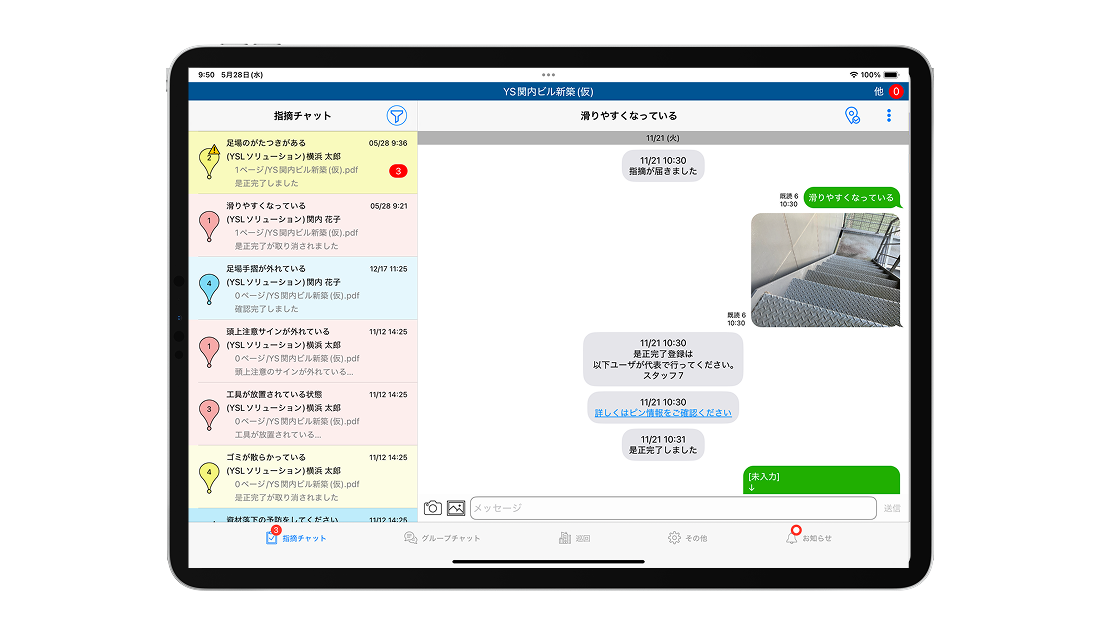
  • A direct chat per instruction until the fix is confirmed
Workflow

One safety patrol with AQuick

Example: loose scaffolding is found.

The supervisor records it

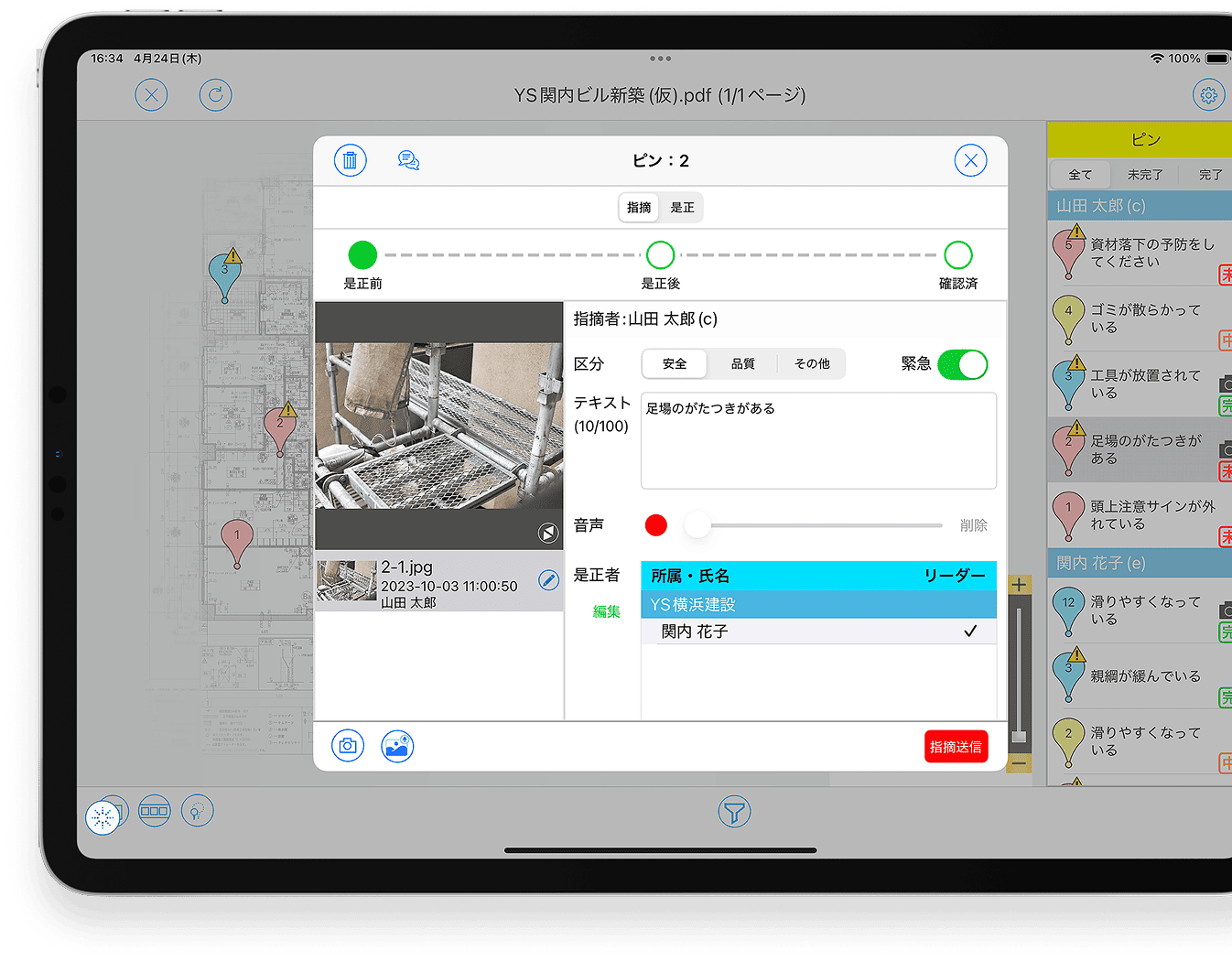
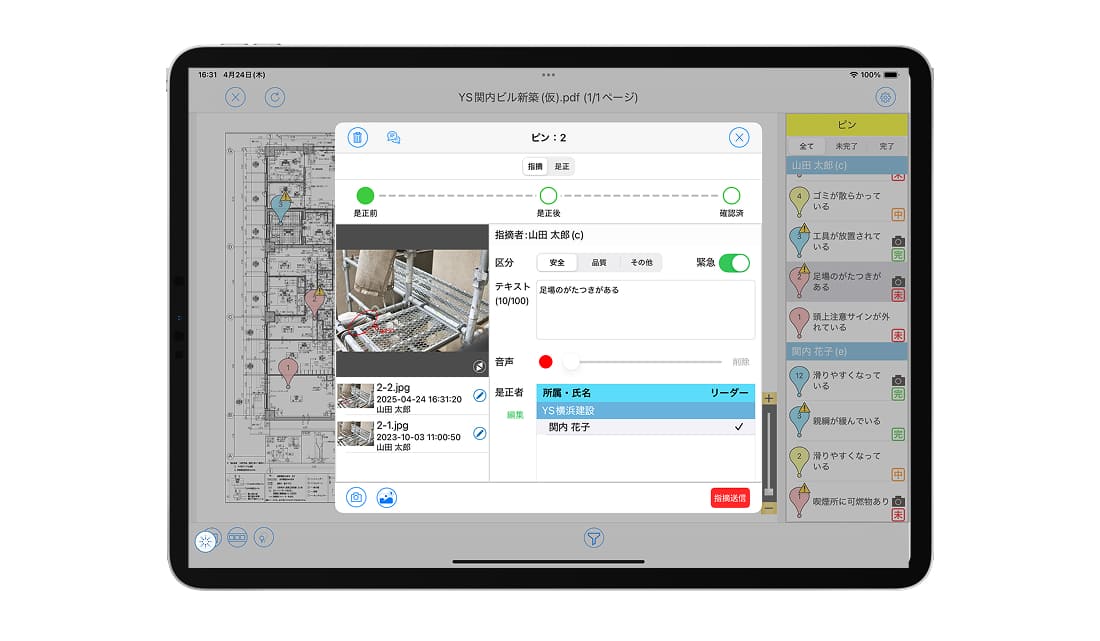
Drop a pin at the spot on the drawing, add text, a photo or a voice memo, assign the person responsible and send.

The subcontractor receives it

The assignee is notified, reads the instruction and carries out the fix.

Completion report

Enter what was fixed with an “after” photo and submit the completion report.

Verify & export reports

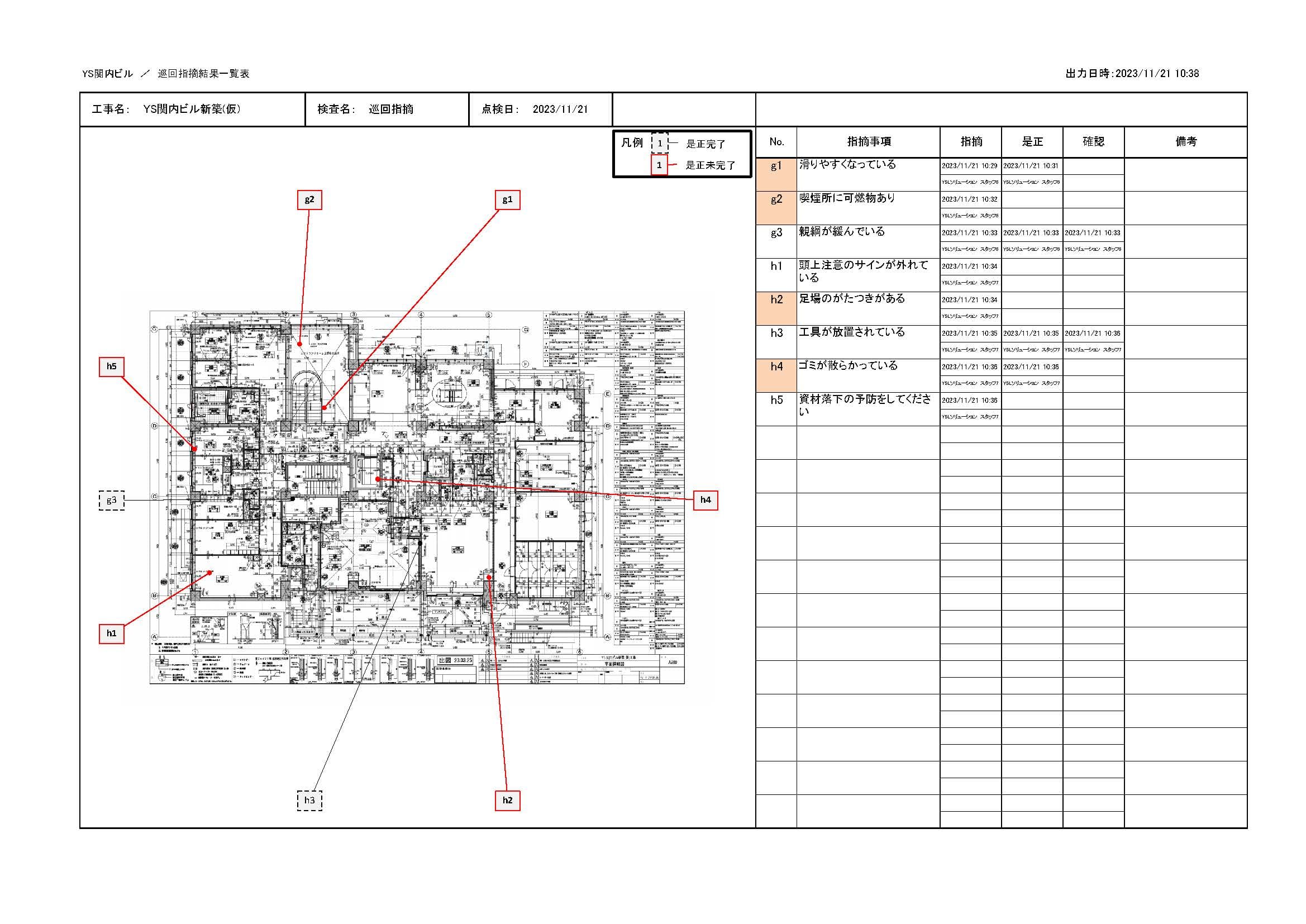
The supervisor confirms; the system exports the patrol instruction list and CSV.

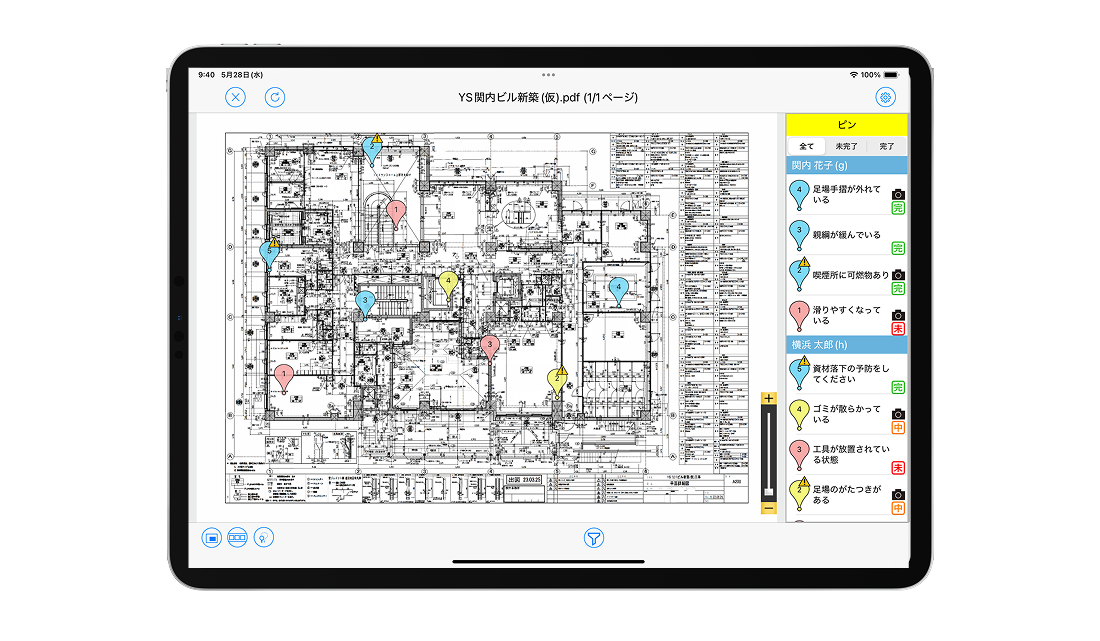
Status is shown by pin colour: Not started (red) · In progress / awaiting confirmation (yellow) · Confirmed complete (green)
Features

AQuick is simple because it has only four core features

01RECORD
02MANAGE
03SHARE
04EXPORT

Record quickly with photos and voice

  • Drop pins on the drawing and attach the instruction and photos to each one
  • Voice input: 30-second recordings are transcribed automatically and appear in exported reports
  • An urgent instruction mode for issues that must be fixed immediately
  • The assignee is notified and the instruction shared as soon as it is sent
  • Pins on the drawing
  • 30-second voice memos
  • Urgent instructions
Recording an instruction in AQuick

Red – yellow – green: see instantly what is still open

  • Pins change colour with correction progress, preventing anything from being missed on re-check
  • Instructions from multiple members are consolidated and displayed together
  • Manage by who issued the instruction and who is responsible for the fix
  • Colour-coded pins
  • Managed by responsible party
Colour-coded status pins in AQuick

A dedicated chat room per instruction

  • Discuss inside each instruction’s chat room until the fix is done — nothing scrolls away as in group chats
  • Stakeholders are notified as soon as a new instruction is issued
  • See who has read it and who has not, so you can follow up individually
  • Regular chat rooms can be created alongside instruction chats
  • Per-instruction chat
  • Read status
  • Instant notifications
Per-instruction chat in AQuick

Patrol reports generated automatically

  • Export the patrol instruction results as Excel
  • Export CSV using the filter conditions you specify
  • All instruction content is stored in a database for later reference
  • Excel
  • CSV
  • Central storage
Exporting reports from AQuick
Comparison

How is it different from group chat or ordinary email?

Lower risk of sending to the wrong person

Ordinary chat: messages go to the wrong person, and data stays on a device after the employee leaves.
AQuick: people outside the organisation cannot be added as recipients, and accounts are blocked once someone leaves.

Safe even if a device is lost

Ordinary chat: a lost device means leaked data.
AQuick: data is wiped remotely with a forced sign-out, and the account is locked via the registered email.

Instructions become visible tasks

Ordinary chat: information scrolls away over time and is easily missed.
AQuick: each instruction has its own status, visualised automatically.

Results

Three common situations, solved

General contractor A

No more forgotten instructions

Before: an issue is spotted but recorded later, or noted in a book and forgotten. After: the instruction is issued on the drawing with a photo, voice memo or text — nothing is missed.

General contractor B

No more misunderstood instructions

With a chat channel per instruction, even a growing number of items still conveys exactly “who – where – what to do”.

General contractor C

Correction progress under control

Before: with so many instructions, nobody knew what stage each was at. After: pins change colour by status and patrols finish with nothing left out.

Why customers choose AQuick

  • Because instructions can be issued instantly
  • Because it prevents instructions from being misunderstood
  • Because management is complete, with nothing missed
Security & system requirements

Safe to use on site devices

Encrypted connections

SSL on all internet connections, with 256-bit encryption strength.

Three-site storage

Data is stored at multiple sites in Japan, meeting BCP requirements.

Lost devices

Lock the account via the registered email and wipe data remotely to prevent leaks.

Devices & languages

iPad, iPhone and Android phones. Interface: Japanese, English.

Pricing

The lowest cost in the YSL APPS suite

Prices are in VND, VAT excluded, converted from the original price list at the rate of 173 ₫/¥ (updated 08/2026) and may change with the exchange rate; the official quotation is confirmed at contract signing.

ItemUnitPrice / month
Server fee (initial storage)1GB173.000 ₫
ID licence1 ID104.000 ₫

Example quotation — 20-ID contract

173.000 ₫ (1GB server) + 104.000 ₫ × 20 IDs = 2.249.000 ₫/month (VAT excluded).

No setup cost · 1 ID = 1 person with unlimited devices · Shares the LAXSY server, so both can be rolled out together · Files converted to the YSL APPS format do not count towards storage.

FAQ

Frequently asked questions about AQuick

Can a recipient be assigned per instruction?
Yes. You can freely assign the person responsible for the fix for each instruction.
Can voice recording replace typing?
Yes. AQuick has a 30-second recording feature to capture voice or site sound instead of a written comment.
With several assignees, how do we know who has read the notification?
AQuick shows read/unread status so you can follow up with those who have not read it. With several assignees, one can be designated as lead to clarify responsibility.
Can we chat about things unrelated to instructions?
Yes. Besides instruction chats, you can create regular chat rooms yourself.
How secure is the cloud?
AQuick runs on AWS and meets international cloud security standards, with encryption and protection against unauthorised access in the app.
Which file formats and devices are supported?
CAD: .dwg .dxf .jww .jwc .zdu .zdx .reb — Documents: .pdf .txt .ppt .pptx .doc .docx .xls .xlsx — Photos/video: .jpeg .jpg .png .gif .tif .tiff .mp4 .m4v .mov. Devices: iPad tablets; iPhone / Android phones.

Digitalise safety patrols in a single session

AQuick can be deployed on its own, or share the LAXSY server to unify the whole inspection and correction flow.